Email header analyzer
Paste a header or drop an .eml or Outlook .msg file: we show, step by step, which server the message left from, every hop it passed, its authentication and what the security filters decided.
The header and message content never leave your browser and are not stored anywhere. Only the public IP addresses and domain names on the path are sent to our server (for network name, DKIM key, SPF record, domain age and the Mailskop score of the sender and recipient domains).
How to find the header
Outlook (web / new)
- Open the message.
- ⋯ (More actions) → View → View message details.
- Copy all of the text and paste it here.
Outlook (classic)
- Double-click the message to open it in its own window.
- File → Properties.
- Copy the "Internet headers" box and paste it here.
Or drag the message to your desktop and drop the resulting .msg file here.
Gmail
- Open the message.
- ⋮ → Show original.
- Click "Copy to clipboard" and paste it here.
Or use "Download original" and drop the .eml file here.
Apple Mail
- Select the message.
- View → Message → Raw Source.
- Copy everything and paste it here.
Or File → Save As → Raw Message Source, then drop the .eml file here.
What we show and what we don’t
- Server names are their writers’ claims; we only trust records written by the recipient’s server.
- No cities. A location goes on the map only when it can be shown, at country or region level.
- "Home/mobile" and "hosting" are inferred from the network name. What we can’t check, we never call absent.
- DKIM and SPF are rechecked against today’s DNS; the delivery-time result is shown separately.
How do you read an Authentication-Results line?
The result of authentication is in the Authentication-Results line written by the server the message arrived at (RFC 8601). The line is made of parts separated by semicolons; each part names a check, its result and what it checked.
Sample line
Authentication-Results: mx.example.com; spf=pass smtp.mailfrom=sender.example; dkim=pass header.d=sender.example; dmarc=pass header.from=sender.example| Part | What it says |
|---|---|
mx.example.com | The identity of the server that wrote the verdict (authserv-id). Trust only the line your own receiving server wrote; any other line on the way could have been written by anyone. |
spf=pass smtp.mailfrom=… | SPF passed for the envelope sender (MAIL FROM). That domain does not have to match the “From” address the reader sees. |
dkim=pass header.d=… | The DKIM signature verified; header.d is the signing domain. A message can carry several signatures, each written as its own part. |
dmarc=pass header.from=… | DMARC passed: at least one of SPF or DKIM passed aligned with the “From” domain. dmarc=none says the sender’s domain had no DMARC record to apply. |
Latest measurements
Mail from a domain with no DMARC record shows dmarc=none in its header: the receiver finds no policy to apply, even to a forgery. We measure how common this is on Mailskop every month; the latest reports:
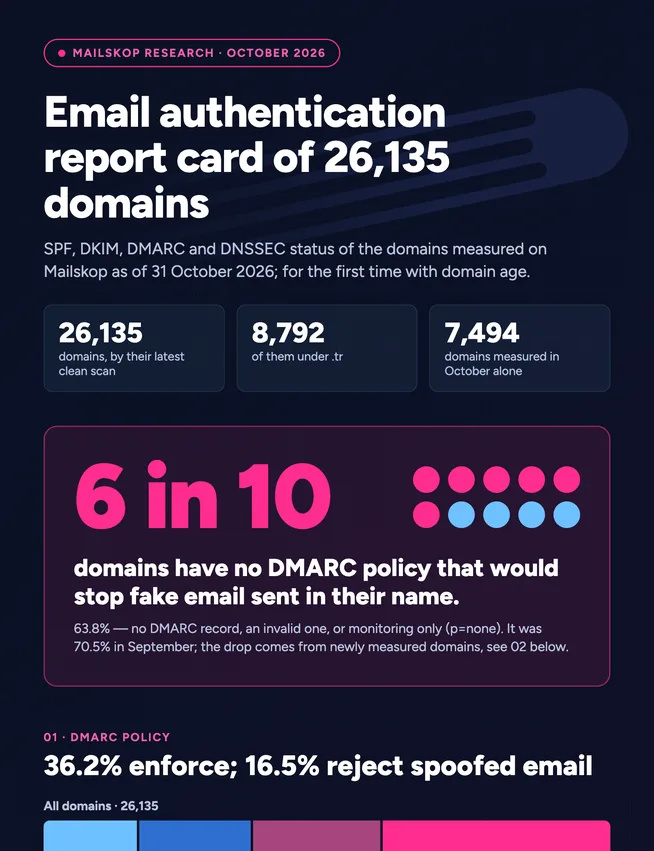 Monthly measurement: October 2026. 63.8% of 26,135 domains measured on Mailskop have no DMARC policy that stops forged email; among those measured since September it is unchanged at 70.4%.
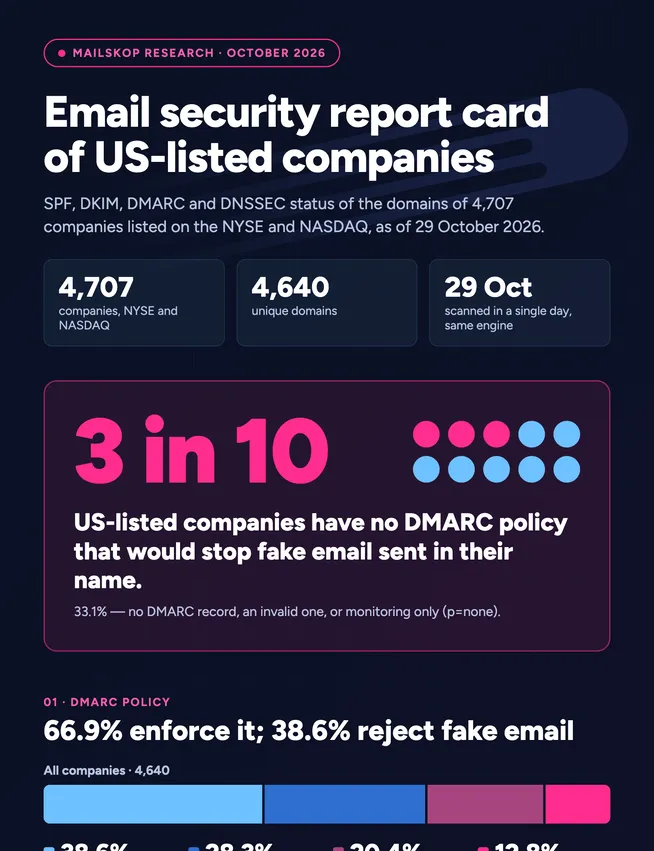 Topic report: US stock exchanges · October 2026. 33.1% of the 4,640 domains of 4,707 NYSE and NASDAQ companies have no DMARC policy that stops forged email; 93.3% of the Dow 30 enforce DMARC, versus 50.5% of micro caps.
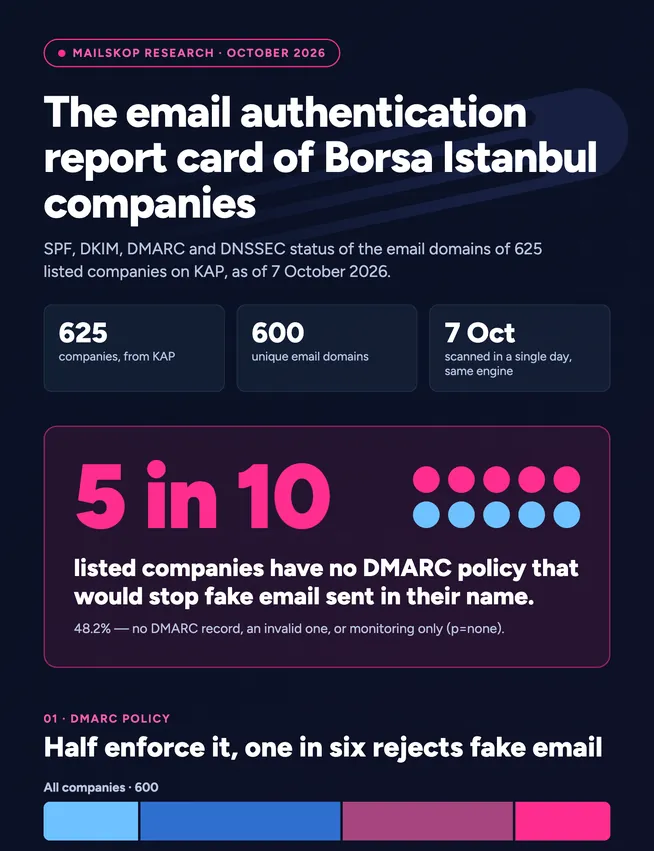 Topic report: Borsa Istanbul · October 2026. 48.2% of 625 Borsa Istanbul companies have no DMARC policy that stops forged email; DNSSEC is on for only 5 of 600 domains.
Frequently asked questions
What is an email header?
The technical lines above a message that you don’t see while reading. Every server that takes over the message adds a Received line on top, and the recipient’s server records the authentication result as Authentication-Results. The path is read from these lines, bottom to top.
What is an email header analysis for?
It shows whether a message came from where it claims, where it waited on the way and what each security filter decided. Use it to examine a suspected phishing email, to find clues to why a message landed in spam or arrived late, and to see how your SPF, DKIM and DMARC setup actually performs on a real message.
How do I view the email header in Outlook?
In new Outlook and Outlook on the web, open the message and choose ⋯ (More actions) → View → View message details. In classic Outlook, double-click the message to open it in its own window, go to File → Properties and copy the “Internet headers” box. In classic Outlook you can also drag the message to your desktop and drop the resulting .msg file here.
How is it different from the MxToolbox, Microsoft and Google header analyzers?
All four show delivery delays. Mailskop also draws the message’s route as a numbered map at country or region level; a hop whose location cannot be shown stays off the map and is listed with the reason. MxToolbox and Google process the header on their own servers; Microsoft’s tool runs in the browser, focuses on Microsoft 365 anti-spam fields and shows no map. Mailskop parses the header in the browser, accepts .eml and Outlook .msg files, re-verifies the DKIM signature against today’s DNS key, shows the network behind every IP on the path and also decodes non-Microsoft security gateways. The full table is in the comparison guide.
Can I tell from the header whether an email is fake?
It often gives strong clues: the DMARC result, a reply address on another domain, a message leaving from a home line or an unexpected country. But a consistent header does not make a message safe; a compromised real account produces a flawless header too.
Is my header sent to your server?
No. The header, body and attachments are parsed in your browser, and the DKIM signature is verified there too. Only individual public IP addresses, the DKIM selector and domain, and domain names are sent to our server — never the part of an address before the @, the subject or the content. Answers are cached for at most a day without any record of who asked. The sender and recipient domains are scanned by Mailskop like any other domain lookup on the site and count in our scan statistics; a domain is public information, not an address or content. If you ask for a PDF or email, only the technical result of the analysis (servers, IPs, domain names, results) goes to our server, and it is not stored.
Does an Outlook .msg file work too?
Yes. The .msg file is opened in your browser; the original headers, the body and attachments are read. One limit: Outlook stores the body converted to its own format, so DKIM can only verify the header signature. To see whether the body changed, you need the .eml.
Why are some hops missing from the map?
There is no reliable location for internal addresses and global cloud networks; an IP’s registration address (Redmond for Microsoft, say) is not where the server is. We only show one when the server name states a region (like AWS eu-west-1 or Microsoft EURP = Europe) or Microsoft recorded the connecting IP’s country in the header.
Sources we rely on
18 sources12 RFCs · 4 other documents
- RFC 5321 §4.4SMTP trace information (Received)Draft Standard; updated by RFC 7504 (status checked: )
- RFC 5322Internet Message FormatDraft Standard; updated by RFC 6854 (status checked: )
- RFC 3848ESMTP transmission types (ESMTPS, ESMTPSA)Draft Standard (status checked: )
- RFC 8601Authentication-Results header fieldProposed Standard; obsoletes RFC 7601 (status checked: )
- RFC 7208 §9.1SPF and the Received-SPF fieldProposed Standard; updated by RFC 7372, 8553, 8616 (status checked: )
- RFC 6376DKIM SignaturesInternet Standard; updated by RFC 8301 (rsa-sha1 forbidden, 1024-bit minimum), 8463 (Ed25519), 8553, 8616 (status checked: )
- RFC 9989DMARC and identifier alignmentProposed Standard; obsoletes RFC 7489 (status checked: )
- RFC 8617ARC (Authenticated Received Chain)Experimental. IETF draft proposes reclassifying it as Historic: draft-ietf-dmarc-arc-to-historic-01 (, not yet approved) (status checked: )
- draft-ietf-dmarc-arc-to-historicReclassifying ARC as HistoricActive Internet-Draft (-01) (status checked: )
- RFC 2045MIME message body formatDraft Standard; updated by RFC 2231, 6532 (status checked: )
- RFC 6376 §6.1DKIM verifier actionsInternet Standard; updated by RFC 8301, 8463, 8553, 8616 (status checked: )
- RFC 8301DKIM crypto update: rsa-sha1 and short keysProposed Standard (status checked: )
- RFC 8463Ed25519 for DKIMProposed Standard (status checked: )
- RFC 7208 §4SPF evaluation (check_host)Proposed Standard; updated by RFC 7372, 8553, 8616 (status checked: )
- RFC 9083RDAP responses (registration events)Internet Standard; obsoletes RFC 7483 (status checked: )
- [MS-OXMSG]Outlook Item (.msg) File FormatMicrosoft Open Specification; built on [MS-CFB] (status checked: )
- Microsoft LearnMicrosoft 365 anti-spam message headersDocument dated (status checked: )
- Team CymruIP to ASN mapping (DNS)Country is the RIR registration country, not a physical location (status checked: )
Last updated: