Guide ·
Email header analyzer comparison: Mailskop, MxToolbox, Microsoft and Google
By: Kemal Özleyen, Cybersecurity Engineer · Check Point Workspace Security Expert · Kinetik Bilişim
All four free header analyzers show delivery delays. Mailskop also draws the message’s route on a country map, parses the header in your browser, accepts .eml/.msg and re-verifies DKIM; MxToolbox and Google process the header on their servers.
Features side by side
Microsoft’s Message Header Analyzer also runs in the browser and focuses on Microsoft 365 anti-spam fields. Beyond these, Mailskop draws the message’s route on a numbered country-level map, opens Outlook .msg files, re-verifies the DKIM signature against today’s DNS key and shows the network behind every IP on the path.
| Feature | Mailskop | MxToolbox | Microsoft MHA | Google Messageheader |
|---|---|---|---|---|
| Where the header is processed | In your browser; only public IPs and domain names reach the server | On the server (the form POSTs the header) | In the browser | On the server (the form POSTs the header) |
| Input | Paste, .eml, Outlook .msg | Paste | Paste; the Outlook add-in reads the open message | Paste, text file |
| Delay between hops | Yes | Yes | Yes | Yes |
| Route on a map (numbered hops, country or region level) | Yes; a location only when it can be shown, hops left off the map are listed with the reason | Not stated | No; shows the country code Microsoft writes into the header as text | Not stated |
| SPF, DKIM, DMARC result | Result and alignment, explained; the recipient’s record decides, the ones on the way inform | DMARC compliance, SPF/DKIM alignment and authentication summary | Authentication-Results as a raw field | Not stated |
| DKIM signature re-verified against today’s DNS key | Yes (in the browser, WebCrypto) | Not stated | No | Not stated |
| Network behind each IP (ASN, type: organisation, cloud, hosting, home/mobile) | Yes | Not stated | No | Not stated |
| Microsoft 365 anti-spam fields (SCL, SFV, BCL, CTRY) | Decoded | Not stated | Decoded | Not stated |
| Other security gateways (Check Point, Proofpoint, Mimecast, Barracuda…) | Decoded | Not stated | As raw fields | Not stated |
| Suspicion signals (From/Reply-To mismatch, display-name spoofing, home/mobile origin) | Yes | Not stated | Not stated | Not stated |
| Attachment and link checks in .eml | Yes | Not stated | Not stated | Not stated |
Checked: 25 October 2026, by reading each tool’s own page, its documentation and, for Microsoft MHA, its published code. “Not stated”: not mentioned on the tool’s page or in its documentation and we could not measure it; it does not mean “no”.
The route on a map
Mailskop draws the hops a message passed through as a numbered route on a world map, with the network name and type next to each hop. Locations are at country or region level and shown only when they can be backed up; hops that cannot go on the map are listed with the reason.
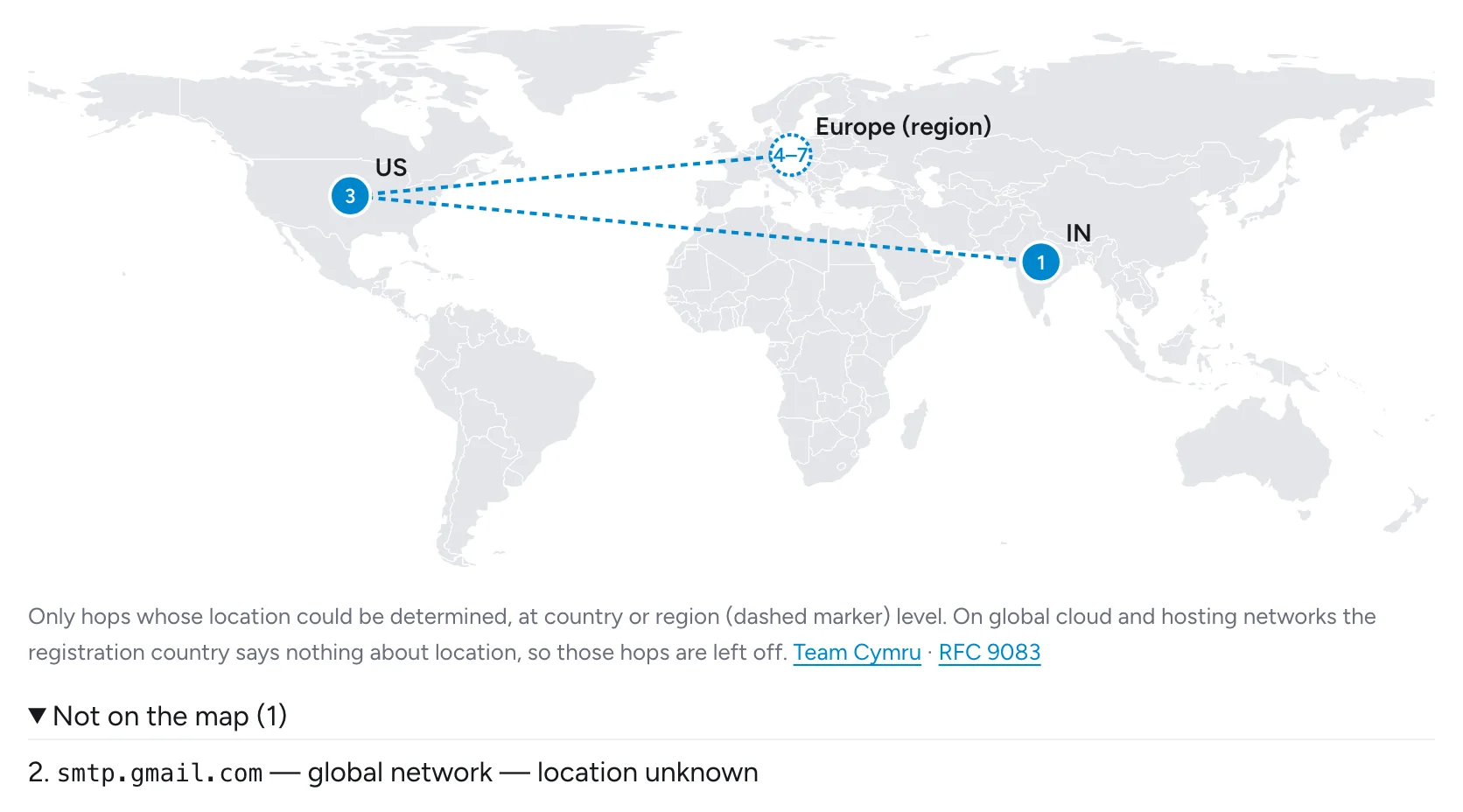
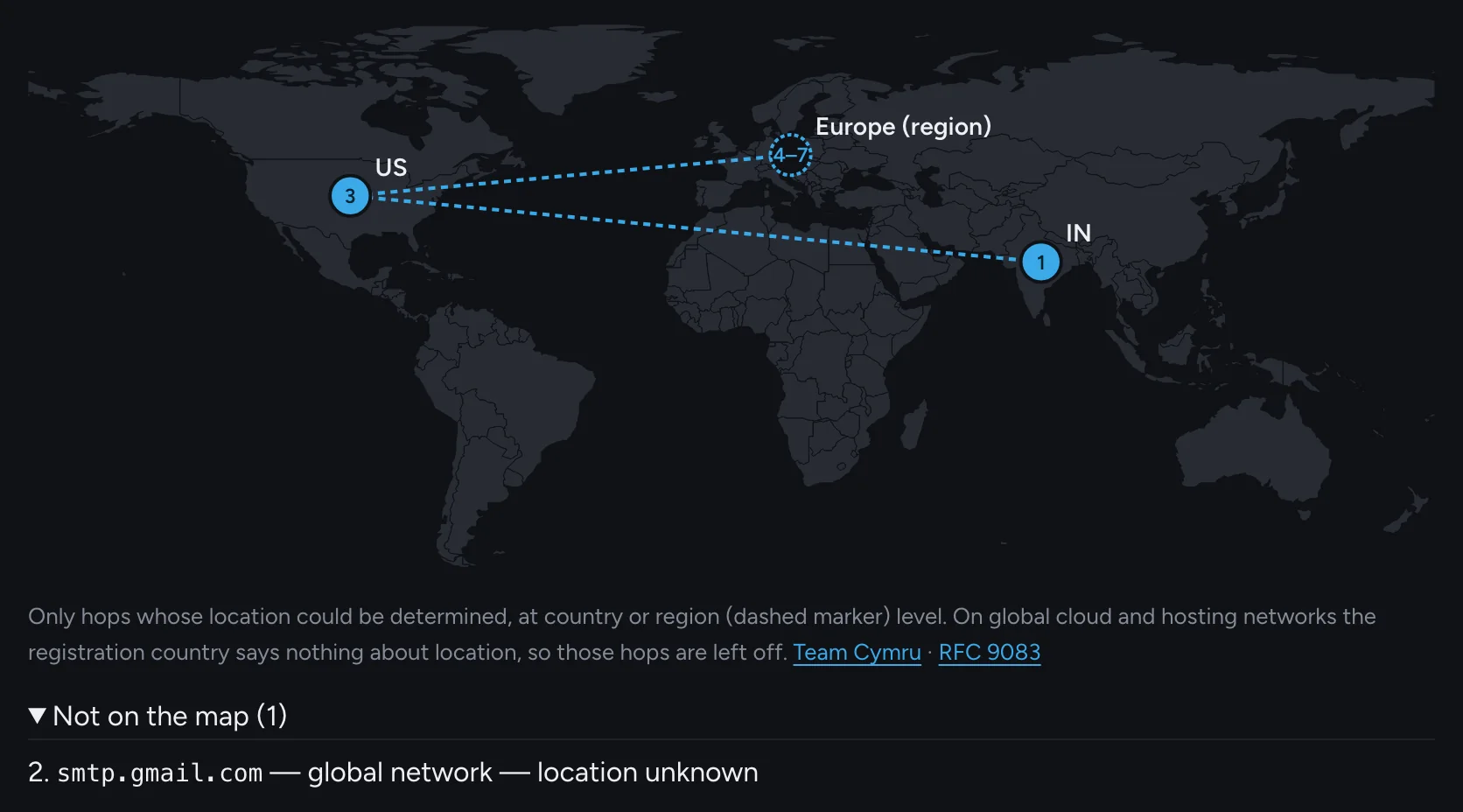
Of the tools in this comparison, Microsoft MHA has no map, and no map is mentioned on the pages or in the documentation of the MxToolbox and Google tools (25 October 2026).
Reading the map: Received lines, location and the VPN warning
How it differs from each tool
MxToolbox Email Header Analyzer
MxToolbox’s tool sends the pasted header to its own server through a form and builds the result there. According to its documentation the report has two main parts: delivery information, showing DMARC compliance and the alignment and authentication status of SPF and DKIM, and relay information, showing the delay between hops.
In Mailskop the header never leaves your browser, and you can drop an .eml or Outlook .msg file directly. The route is drawn on a numbered country-level map; on top of that the DKIM signature is re-verified against today’s DNS key, the network and network type behind every IP on the path are shown, security gateway verdicts are decoded, and suspicion signals such as a From/Reply-To mismatch are marked as “evidence” or “indication”.
Microsoft Message Header Analyzer (MHA)
Microsoft’s tool also runs in the browser and, as an Outlook add-in, can read the open message directly. Its strength is Microsoft 365’s anti-spam fields: it explains values such as SCL, SFV, BCL and CTRY. Authentication-Results, however, is listed as a raw field; it does not verify the DKIM signature or look up the networks of the IPs on the path.
Mailskop decodes the same Microsoft fields and adds the fields of other gateways such as Check Point, Proofpoint, Mimecast and Barracuda, an explained SPF/DKIM/DMARC result, DKIM re-verification, network information and a country-level route map. It accepts .eml and .msg files.
Google Admin Toolbox Messageheader
Google’s tool focuses on delivery delays: according to its page it finds the delay, its approximate source and who may be responsible. The header is sent to Google’s server through a form. It has a Turkish interface.
Alongside the delay, Mailskop shows the route on a map, authentication, the DKIM signature, the networks on the path, security filter verdicts and suspicion signals on one screen; the header never leaves the browser.
Why keep the header off someone else’s server?
A header is not just technical lines: it also carries the sender’s and recipient’s email addresses, the subject line, an organisation’s internal server names and IP addresses. An email address is personal data. When a suspected phishing email is examined, this information also ends up with a third-party service.
In Mailskop parsing and DKIM verification happen in the browser. Only individual public IP addresses, the DKIM selector and domain, and domain names are sent to the server; the part of an address before the @, the subject and the content are never sent. Answers are cached for at most a day without any record of who asked; the sender and recipient domains count in our scan statistics like any other domain lookup on the site.
Frequently asked
Which header analyzer shows the message’s route on a map?
Mailskop’s header analyzer draws the hops a message passed through on a numbered map at country or region level and shows the network of each hop; hops whose location cannot be shown stay off the map and are listed with the reason. Of the tools in this comparison, Microsoft MHA has no map, and no map is mentioned on the MxToolbox and Google pages (25 October 2026).
Is there a free alternative to MxToolbox’s header analyzer?
Yes. Mailskop’s header analyzer is free, needs no sign-up and parses the header in your browser. Alongside delays it shows the route on a map and offers an explained SPF/DKIM/DMARC result, DKIM signature re-verification, the networks on the path and .eml/.msg support.
What is the main difference between Microsoft Message Header Analyzer and Mailskop?
Both run in the browser and decode Microsoft 365 anti-spam fields. Mailskop adds a map of the message’s route, cryptographic DKIM verification, network information for the IPs on the path, non-Microsoft security gateways and .eml/.msg file support. MHA’s Outlook add-in, on the other hand, opens the message from inside Outlook without copying.
Does Google’s header tool show the SPF, DKIM and DMARC result?
The tool’s page does not mention them; according to the page its purpose is finding delivery delays and their source. In Mailskop the SPF, DKIM and DMARC result, which record decides and alignment are explained on the same screen.
Other guides
- From RFC 7489 to RFC 9989: what to change in your DMARC record
- DMARC from
p=nonetop=reject, step by step - The SPF 10 DNS lookup limit: why it is exceeded and how to fix it
- Setting up SPF, DKIM and DMARC for Microsoft 365
- Setting up SPF, DKIM and DMARC for Google Workspace
- Gmail, Yahoo and Outlook bulk sender requirements
- Where was an email sent from? Tracing its route and IP location from the header
- Measurement: Email security measurement, September 2026: DMARC, SPF and DKIM across 21,197 domains
Last updated: